Hacking The Omnitech 16878-US | The Nerd Show
Games
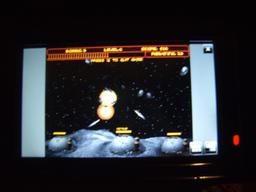
An Omnitech 16878-US GPS arrived from craigslist for $20 in early 2011. It came with worthless manuals and a CD full of PC goodies nobody wants. The unit once sold at Staples and their parent company, Quill.com. The Omnitech 16878-US GPS and other palm-type devices running Windows CE are great for hacking. The Omnitech has been discontinued, so the used market may be the best place to find one of these, or something similar.
Bicycle mount
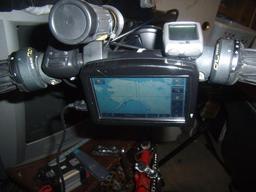
The Omnitech 16878-US GPS comes with a suction cup mount, but it wasno problem to attach the unit directly to thebicycle using zip ties. Under settings there is a setting for Bicycle orPedestrian that calculates routes avoiding major highways and freeways.
One of the first things to notice Omnitech is that it badly needs updates. We're going to have to fix that. There are no Navigon Canadamaps and no driving maps for Alaska. Included Navigon maps are privy tothe lower 48 states only. It would have been great if there were NavigonMexico maps, too, but the SD card is too small to fit all thosemaps. The included Destinator 7 mapping software has no new mapsor hacks; the promised map update apparently never released. Followinga hint from this website forum post: Searchingaround popular pastebins and sharing sites for links to a download called"Navigon and iGo Complete," did the trick.
Do not ask for a link
Any link we provide is likely to stop working. Navigon and iGo arecommercial, copyrighted software and downloading or distributing them maybe illegal in some countries. This information is for educational purposesonly. We do not condone software piracy here, only the freedom to learnabout and use our technology in any way we see fit. We just wanted to try them out first, before buying. ;)
Street map and route software
iGo Maps Look Good

Navigon and iGo are two different mapping products that are compatiblewith Microsoft Windows CE (WinCE) 5.0, the operating system of the Omnitech16878-US GPS, and other small devices like these. Editing the torrent andchecking off only a few maps saves time.While the download was in progress, a firmware update purported to fixthe clock showing the wrong time, following the instructions onnavsupport.net/navsupport/gps/quickfix/ installed smoothly,but did not work.
The original Omnitech 16878-US SD card backed up easily. Copying the new NK dot bin file to it and installing the SD card back into the unit went as planned. The procedure is likely to be the same on most other Palm PCs and devices. After the update had completed pressing the reset button using the stylus brought up our custom menu. It is always best to back up the files before hacking!
Hat Island

Once the new mapping software, Canada maps, and Alaska maps finisheddownloading, I removed the Omnitech SDRAM card from the powered-off unitand installed it in my PC again, erased it, and installed the Navigon andiGo Complete software and world maps following the directions in theincluded "READ ME FIRST.txt" www.techsmarttips.com is the password for theincluded SD_Shell.rar. I also installed the font update from the aboveforum post. The instructions said it could take hours, but it only took afew minutes to find satellites again after the update.
Navigon Maps
Navigon Maps
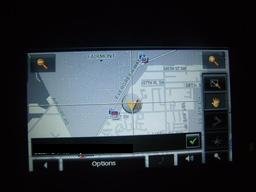
Having different versions of mapping software installed on the GPS makesit seem like different GPS units! Of the two mapping software packages, Iprefer the iGo software and that is what I would recommend installing onthe Omnitech 16878-US based on my review of its look, features, andperformance.
Mio Pocket
Mio Pocket
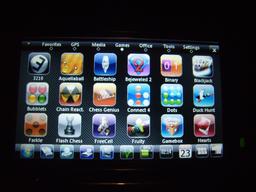
Installation of Mio Pocket requires a freshly formatted 2GB SD card. SDHCcards of 4GB or more are confirmed not to work.
Mio Pocket unlocks the full capabilities of the unit, including a Palm OSstyle desktop. A Windows XP style taskbar and programs are included toenable the WinCE functionality of the Omnitech 16878-US GPS.Having the unit boot with setup menu required changingwww.gpspassion.com/forumsen/topic.asp?TOPIC_ID=136798 to support Mio Setup. This lets the GPS start faster when needed without going through the full WinCE boot. First, copy above setup of Navigon and iGo from backup.
Crete an icon for MioAutoRunand copy the MioAutoRun folder, MioAutoRun.exe and MioAutoRun.mscr tothe root of that card. Finally, go into Skins and change the contentsof SysInfoSettings.ini to "MainMenu\MainMenu04.ini" and change one of the icons to point to "Command = \SDMMC\MioAutoRun.mscr" so it will run theMio Setup any time. The first time it installed a bunch ofthings and powered off. The next time I ran everything worked.
Marine Charts
Raster Navigational Charts
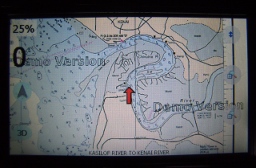
A variety of programs may be used to display marine or nautical charts andtrack position on WinCE devices like the Omnitech 16878-US GPS. Thefirst one that worked with a limited budget and time schedulewas the demo version of OziExplorerCE. First, downloadthe PND version of OziExplorerCE and extract it to a folder on thedevice's SD card. Then download the PC version of OziExplorer. It may berun on Linux using wine. The PC version includes a demoversion and a trial version. The trial version is able to import USGSraster navigational charts and convert them to .map files usable byOziExplorer on the PC, however; the newly created nautical charts will notwork on the GPS without further conversion. To convert the .map versionsof USGS raster charts into the proprietary Ozfx3 format for OziExplorerCE,download Img2ozf and run that. Finally, copy the .map and.ozfx3 files to the corresponding Maps folder on the device.
Further Hacking
Startup Screen Hack

We replaced the startup screen with our own hacked-together logo. The TomTom launches Mio Setup. To create the backdrop, create an image the same size as the original and save it as a bmp image. Being Windows CE, the Omnitech 16878-US can run practically anything for ARM processors and WinCE 5.0. Install Microsoft ActiveSync for Windows. ActiveSync does not work on Linux, so we had to use cabextract to extract the files manually and rename them according to strings in the ..000 files... The bigger 2GB SD card is needed for it to hold the files. The unit is only compatible with SDSC cards up to 2GB, which is what we had. The Omnitech 16878-US does not understand newer SDHC 4-32GB and SDXC 32GB-2TB cards. Just to be sure, we tried a 4GB SDHC card and even tried the hacks that came with Mio Pocket and it would not read or boot with it. Happy hacking!
References
Visible links
- thenerdshow.com/hacks/omnitech/256x192/omnitech-16878-US-alaska.jpg
- navsupport.net/navsupport/gps/quickfix/
- thenerdshow.com/hacks/omnitech/256x192/omnitech-16878-US.jpg
- thenerdshow.com/hacks/omnitech/256x192/omnitech-16878-US-iGo-3D.jpg
- thenerdshow.com/hacks/omnitech/256x192/omnitech-16878-US-Navcon.jpg
- thenerdshow.com/hacks/omnitech/256x192/omnitech-16878-US-mio-pocket-wince.jpg
- thenerdshow.com/hacks/omnitech/256x192/omnitech-16878-US-games-hack.jpg
- www.gpspassion.com/forumsen/topic.asp?TOPIC_ID=136798
- www.oziexplorer.com/
- www.gps-forums.net/bsb-kap-map-t10105.html
- www.oziexplorer3.com/ozice/downloads/v2a/wince_core_runtime_arm.zip
- www.oziexplorer2.com/eng/downloads/395/oziexp_setup.exe
- winehq.org/
- www.oziexplorer3.com/img2ozf/img2ozf.html
- www.instructables.com/id/Adding-a-Microphone-to-the-Omnitech-GPS-System-for/
- comptune.com/
- mixculture.org/
- code.google.com/p/greenhorn/
- code.google.com/p/crowbar/
- thenerdshow.com/platypus.html
- mailto:nospam@thenerdshow.com
 Copyright © 2026 Henry Kroll III, thenerdshow.com This web page is licensed under a Creative Commons Attribution-ShareAlike 3.0 Unported License.